Best Digital Photo Book Maker: A Real-World Comparison
Find the best digital photo book maker for your family memories. Compare ease of use, print quality, privacy, and pricing for adults 50+.
Your parent has thousands of photos on a phone, a drawer full of old prints, and no finished album. You sit together on the sofa, scrolling past blurry duplicates, screenshots, birthday candles, and the same holiday photographed from twelve angles. The intention is good, but the project keeps getting postponed because choosing, arranging, captioning, and printing feels like a second job.
The best digital photo book maker isn't the service with the most templates or the lowest advertised price. For families, especially households with older adults, it must help you finish the book, reproduce photographs faithfully, protect private images, and leave your family with something they can access years from now. A polished editor is useful, but it isn't enough if the account becomes inaccessible or the originals disappear.
A useful introduction to the broader idea is this guide to what a memory book is. A printed album can become part of that record, alongside names, dates, stories, voice recordings, and family context. The recommendations below focus on that continuity problem, not just on making an attractive object.
Table of Contents
- Why Choosing the Right Photo Book Maker Matters
- The Three Main Types of Digital Photo Book Makers
- How the Leading Photo Book Services Compare
- Print Quality and Paper Choices That Actually Matter
- A Realistic Workflow for Finishing a Family Book
- Privacy, Ownership, and What Happens to the Book in Ten Years
- Which Service to Choose for Your Situation
Why Choosing the Right Photo Book Maker Matters
The hardest part usually happens before the editor opens. A daughter wants to help her father create a book about his working life, while he wants to include photographs from childhood, holidays, and family gatherings. She wants a manageable project. He wants every image because each one carries a story.
That difference determines whether the book gets completed. A service with automatic layouts may get a first draft moving, but an editor that hides captions, makes cropping difficult, or requires constant dragging can exhaust the person doing the work. A book that never leaves the draft folder has no value to the grandchildren who might one day read it.
Photobooks have deep historical roots. Anna Atkins and William Henry Fox Talbot helped establish photography books as an important way to distribute images before the twentieth century, and photobooks often reached wider audiences than exhibitions. The publishing ecosystem later expanded substantially, with approximately 100 publishers worldwide devoted partly or entirely to photography in 1999, followed by an almost fivefold increase over the next two decades, according to Aperture's history of the photobook.
The practical test: Can an older adult use the editor without constant rescue, and can the family still retrieve the photographs and stories later?
A modern maker extends that tradition by making curation and layout accessible to people who aren't designers. It should help a family arrange images by chronology, add names and places, preserve context, and produce a physical record. That makes the service a continuity system, not merely a printing button.
Judge every option against four questions:
- Can we finish it? The editor should offer automation without locking the family into rigid layouts.
- Will the printed book look right? Portraits need accurate skin tones, clear detail, and controlled contrast.
- Who controls the archive? You should understand storage, deletion, exports, and account access.
- Will another relative understand it? Captions, dates, and readable typography matter as much as visual polish.
The right choice varies by household. A grandparent making one gift album needs simplicity. A family historian building a memoir needs text control and durable files. A privacy-conscious family may prefer fewer cloud features and more local ownership. The rankings that follow keep those differences visible.
The Three Main Types of Digital Photo Book Makers
Before comparing brands, identify the kind of tool you're buying. The category determines how much control you'll have, where the files live, and how quickly a relative can move from a phone full of images to an order.
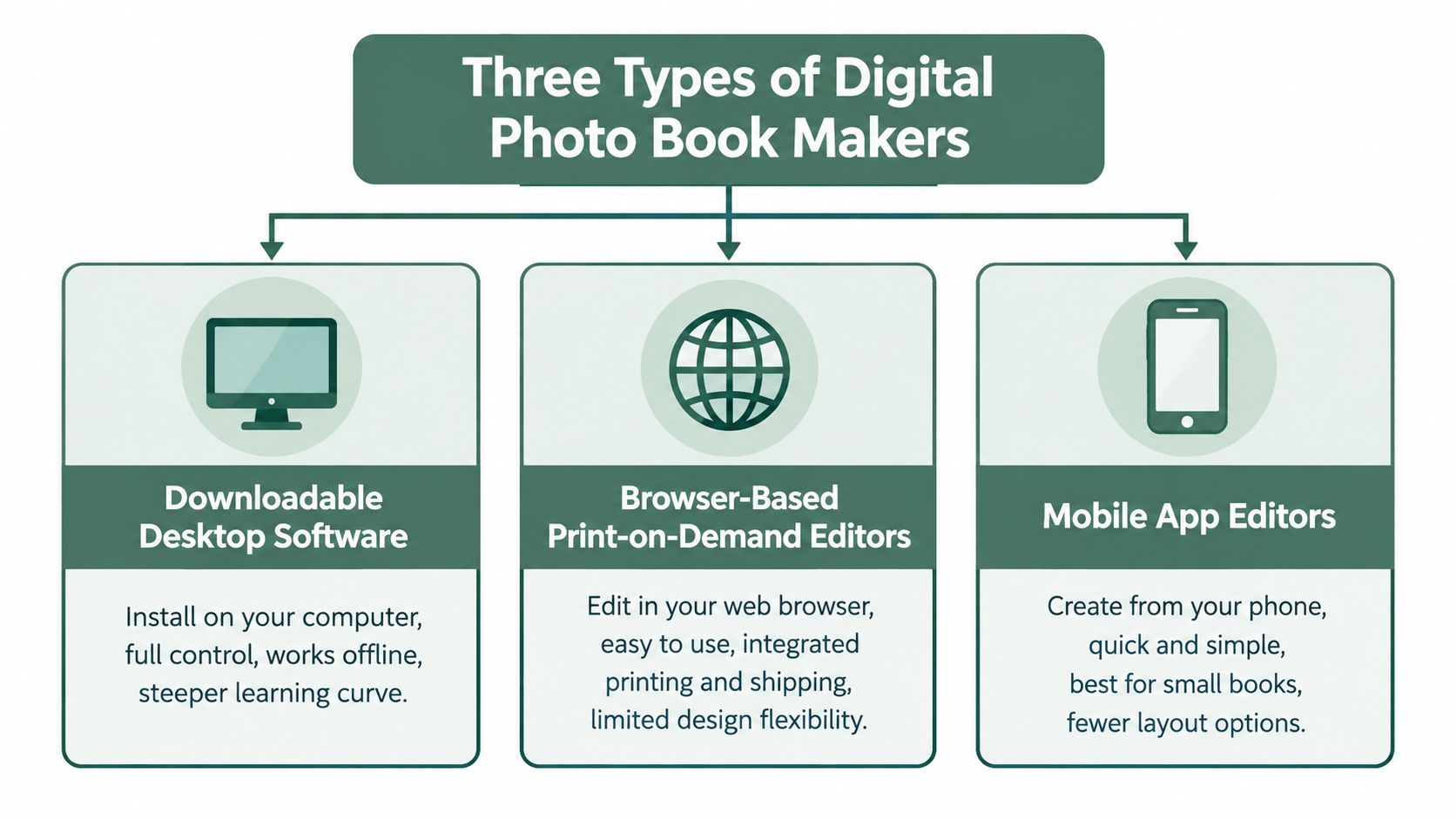
Downloadable desktop software
Desktop applications install on a computer and usually provide the strongest control. You can work with larger screens, organize folders more comfortably, and sometimes design without a continuous internet connection. This format suits a family historian, photographer, or confident computer user who wants precise placement, detailed text, and the option to preserve a local project file.
The trade-off is friction. Installation, file management, font choices, and page setup can confuse someone who only wants to select holiday photographs. Desktop tools also make it easier to overwork a book. A parent may spend an evening adjusting margins instead of writing the caption that explains who is standing beside the old car.
Browser-based print-on-demand editors
Browser editors run inside a website and connect the design directly to printing, payment, and shipping. They usually offer templates, automatic layouts, drag-and-drop placement, and image uploads from common cloud services. This is the best starting point for a busy family making a birthday, holiday, or annual album.
Convenience comes with dependence. The editor may require a stable connection, and the project remains tied to the provider's account system. Layout control can also be limited, especially when you want a page with several text blocks, a timeline, or a deliberate mix of large and small images.
Mobile app editors
Mobile apps fit the way many families now capture photographs. They can make a small book quickly from a camera roll, and their simplified interfaces reduce the number of decisions. They work well for a travel recap, a grandparent's gift, or a regular stream of short family albums.
The phone is also the limitation. Fine caption editing, reviewing tiny faces, checking image resolution, and moving many photographs into a coherent chronology are harder on a small screen. Mobile tools are excellent for speed and completion, but they aren't the right choice for a text-heavy family history.
A simple rule helps: choose desktop software for control, a browser editor for balanced convenience, and a mobile app for fast, repeatable books. Some companies offer more than one format, but the underlying trade-off remains the same.
How the Leading Photo Book Services Compare
The services below solve different problems. Prices, promotions, shipping regions, and product ranges change, so check the current order screen before committing. The table avoids invented price claims and focuses on the decision most families need to make.
| Service | Editor Ease for Adults 50+ | Starting Hardcover Price | Best Fit |
|---|---|---|---|
| Blurb | Moderate, with more control and a steeper learning curve | Check current product page | Family histories, memoirs, and text-rich books |
| Artifact Uprising | Easy to moderate, with a deliberately limited editor | Check current product page | Milestone gifts and heirloom-style albums |
| Chatbooks | Easy, especially on mobile | Check current product page | Frequent family, baby, and travel books |
| Shutterfly | Easy, but the number of options can overwhelm | Check current product page | Non-designers who want templates and broad product choice |
| Mixbook | Easy, with flexible template editing | Check current product page | Families wanting a quick start with room to adjust |
| CEWE | Easy to moderate, depending on the chosen app or desktop tool | Check current product page | Budget-conscious users seeking guided design |
Blurb for the family historian
Blurb earns its place when a book needs to read like a book, not just look like an album. Its desktop and professional workflows suit interviews, memoirs, family timelines, and pages where text has equal importance to photography. It demands more attention than a phone-first service, but that effort buys greater control over typography, sequence, and page structure.
Choose Blurb when a relative has stories to tell and someone in the family is willing to manage the design. Skip it for a quick gift if nobody wants to learn a more involved editor.
Artifact Uprising for a special milestone
Artifact Uprising is the more focused choice for a wedding, anniversary, major birthday, or other event where the finished object should feel restrained and substantial. Its smaller set of design decisions can be helpful for adults who freeze when presented with endless backgrounds, stickers, and decorative elements.
The limitation is intentional. Families wanting long captions, complex chronology, or unusual layouts may find the editor too restrictive. For a carefully selected milestone book, that constraint keeps the photographs in charge.
Chatbooks for families that need a system
Chatbooks is built around low-friction, phone-based creation. That makes it a strong option for parents and grandparents who are behind on albums and need a repeatable habit rather than a one-off design project. Its simpler layouts reduce perfectionism, which is often the reason family books remain unfinished.
It isn't the pick for a formal family history. Use it when the goal is to keep memories moving from the camera roll into a physical format without turning every order into a major undertaking.
Shutterfly and Mixbook for guided flexibility
Shutterfly suits a non-designer who wants abundant templates, gifts, calendars, and other photo products in one place. The risk is decorative overload. A clean template with restrained backgrounds will usually serve the photographs better than adding every available border and embellishment.
Mixbook is a sensible alternative for users who want automatic layout help but still expect to adjust pages. Its browser and app experience can get a novice started quickly, while flexible layouts leave room for manual corrections. Neither service should be judged by the editor alone. Order a proof and examine faces, captions, dark areas, and page edges before making a larger family order.
CEWE for a guided, budget-conscious project
CEWE is worth considering when a family wants a straightforward design process, broad format choices, and a lower-pressure introduction to photo books. Its automated selection and layout tools can reduce the first round of sorting, which helps users who are intimidated by a blank project.
The compromise is fewer premium customization choices than a specialist or professional workflow. For a holiday recap or family yearbook, that may be a benefit rather than a problem.
Print Quality and Paper Choices That Actually Matter
A screen can make almost any photograph look acceptable. The printed page is less forgiving. A dark portrait may lose shadow detail, a face may acquire an unnatural color cast, and a thin page may show the image from the reverse side.
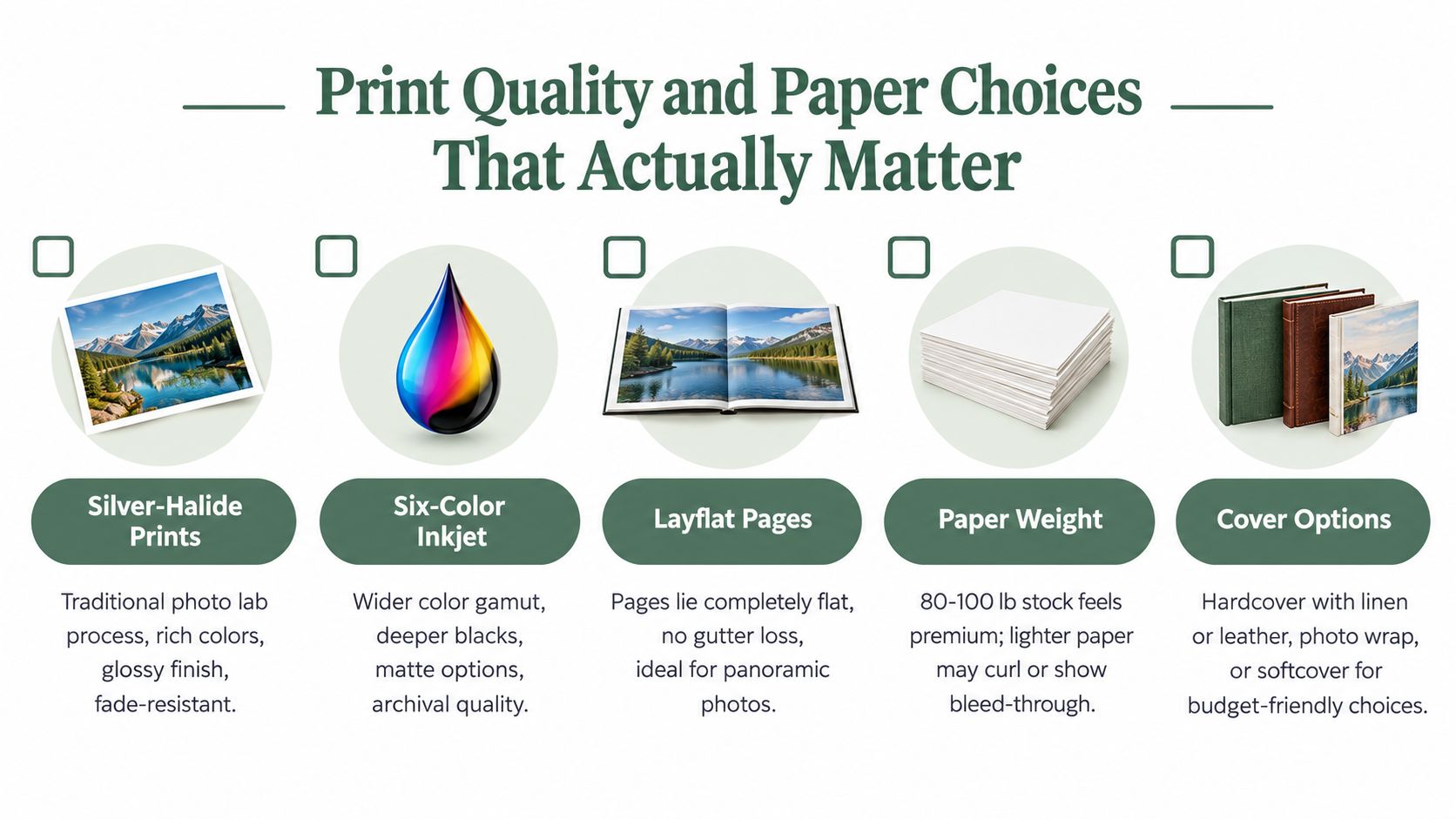
The printing process influences the result. Silver-halide printing is associated with sharp, color-accurate photographic reproduction. Six-color inkjet systems can create smoother tonal transitions and broader color coverage than basic four-color workflows. Standard digital press output can be perfectly suitable for family albums, but a provider should explain what process it uses rather than hiding behind phrases such as “premium quality.”
Paper and binding decisions
Paper weight affects handling, opacity, and perceived quality. Thin stock can allow bleed-through, which makes text and photographs harder to read in bright rooms. Lay-flat binding helps panoramic images cross a spread without losing important content in the gutter, although the upgrade may increase the order cost.
A specialist comparison discusses photographic paper around 368 gsm and the value of published ICC profiles for previewing color before ordering. It also explains why thin stock can permit bleed-through. You can review those material considerations in this photo book printing comparison.
Ask these questions before ordering:
- What are the paper weight, finish, and opacity? A glossy finish can make colors appear vivid, but glare may frustrate older readers. Matte paper is often easier to view under household lighting.
- What print process is used? Ask whether the book uses a photographic process, inkjet, or digital press, and whether the service publishes color profiles.
- Can I order a proof? A physical proof reveals problems that a screen preview can't, including clipped highlights, weak blacks, small captions, and binding issues.
Use the same source files when testing services. Compare a portrait, a low-light image, a black-and-white photograph, and a compressed phone image. Independent testing emphasizes high-resolution detail, skin-tone accuracy, dynamic range, and the avoidance of blur or oversaturation. A useful guide to how to design a commercial photo book can also help families think about sequencing, typography, and the relationship between image size and page rhythm.
For older readers, typography deserves equal attention. Choose strong contrast, readable type, and captions large enough to identify people without a magnifying glass. If you're first working with scanned prints, this guide to how to digitize old photos can help you prepare cleaner source material before you start the layout.
A Realistic Workflow for Finishing a Family Book
Most abandoned photo books fail during selection, not design. The family opens the editor too soon, uploads everything, and then tries to make decisions while dozens of thumbnails compete for attention.
Start outside the editor
Create a folder for the project and make subfolders by person, event, or period. Remove duplicates, screenshots, accidental images, and photographs where nobody can identify the subject. Don't aim for perfection. Aim for a set that tells a coherent story.
Draft captions in a plain text document before opening the book maker. Write names, places, approximate dates, and one sentence of context. This prevents the editor from becoming a research desk, and it gives an older relative a simple way to review facts without navigating a complicated interface.
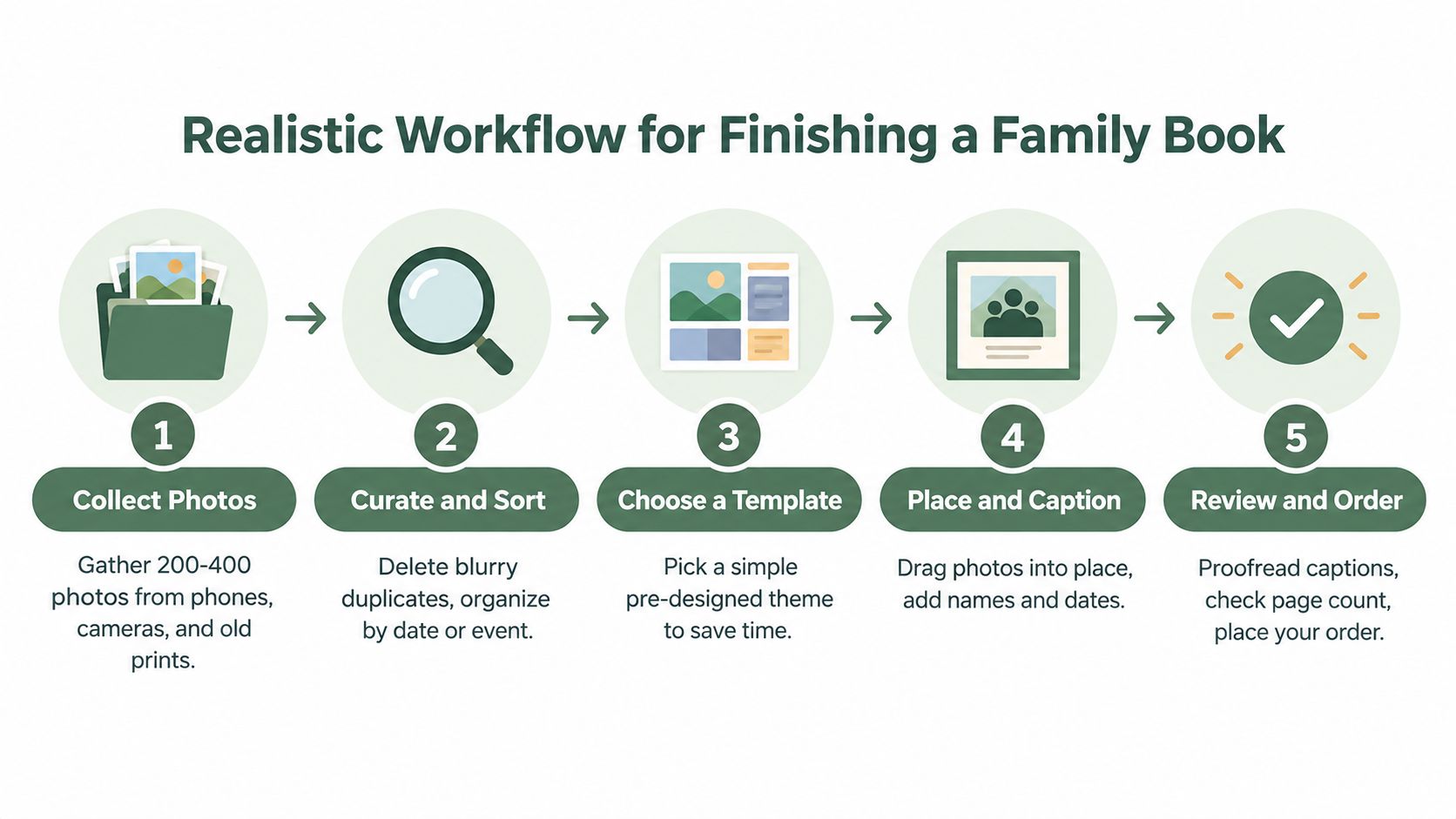
A workable sequence looks like this:
- Collect and copy. Put phone images, camera files, and scans in one project folder. Keep the originals in a separate backup location.
- Curate by story. Group photographs around a journey, relationship, home, job, celebration, or period of change.
- Choose a quiet template. Start with restrained layouts, consistent margins, and enough space for captions.
- Place the essential images first. Build the chronology before adding decorative pages.
- Review the physical proof. Inspect faces, page turns, captions, cropping, contrast, and the cover before ordering copies.
Independent testing found that intuitive editors with flexible layouts served broad audiences better than highly constrained tools, provided the final output preserved detail, skin tones, and dynamic range. That is why automatic layout should be a starting point, not a final authority.
A useful family rule: Every photograph should answer at least one question, such as who, where, when, or why it matters.
Leave room for family knowledge. The person in the photograph may be the only one who knows the house name, the occasion, or the relationship between two relatives. A caption such as “Summer holiday” will age badly. “Margaret and Peter outside the cottage near Whitby” gives the next generation something they can understand.
Use this guide to organize family photos before you begin if the source material is scattered across devices. Once the first book is complete, keep the folder structure and caption document. The next project will feel less like a rescue mission and more like a repeatable family practice.
Privacy, Ownership, and What Happens to the Book in Ten Years
A polished editor can still be a poor choice for private family material. Uploaded photographs may include children, medical experiences, home addresses, school uniforms, or relatives who never agreed to have their faces stored by a commercial service.
Read the privacy policy in plain language. Check where photographs are stored, whether the company uses them for marketing or artificial intelligence training, how long files remain after cancellation, and whether permanent deletion is available. Confirm the difference between encrypted transfer and encrypted long-term storage. They protect different parts of the process.
The questions rankings usually miss
Ask the provider:
- Can I download the original photographs and captions?
- Can I delete the account and confirm deletion?
- What happens if payment stops?
- Can a trusted relative access or inherit the account?
- Can I share one project without exposing the whole archive?
- Can I keep an offline copy that another family member can open?
The printed book is only one part of the archive. Research on older adults' end-of-life data planning found that people wanted to preserve family photographs, letters, scrapbooks, and memoirs for future grandchildren while worrying about cloud permanence. Some participants used redundant storage, including multiple servers and paper backups, as described in this study of digital legacy planning. For a practical process, use this guide to digital legacy planning.
The archive shouldn't depend on one password, one subscription, or one surviving relative.
For a 50-plus household, accessibility belongs alongside security. A trusted contact should know where exports are stored and how to find the physical books. Keep a simple record of the service, account email, project files, download location, and instructions for revoking access.
A digital life-story platform serves a different purpose from a print service. remembers.life lets families combine photographs with written stories, milestones, videos, and voice recordings in a timeline-style record, with invited relatives able to contribute. It can preserve context that a printed page cannot hold, while the family still maintains its own exports and physical copies.
The strongest continuity system gives relatives choices: private sharing, controllable permissions, downloadable originals, clear deletion rights, and files that remain understandable if the provider changes. Price and print quality matter, but trust comes first when the photographs contain a family's personal history.
Which Service to Choose for Your Situation
For a grandparent making one gift album, choose Artifact Uprising if the project is a milestone and the family wants a restrained, substantial keepsake. Choose Mixbook as the practical alternative when you need more layout flexibility and a faster start. Avoid Blurb unless someone in the household wants to manage a more involved design process.
For a family historian building a multi-decade record, choose Blurb. Its stronger text and layout control suit interviews, timelines, captions, and memoir-style pages. Keep a local copy of the text and image files, and consider a simpler service only for duplicate gift albums.
For a casual traveler or busy parent, choose Chatbooks when the priority is finishing frequent, uncomplicated books from a phone. Mixbook is the backup if you want more control over individual pages. Avoid an elaborate professional workflow unless the trip deserves a permanent heirloom treatment.
For a non-designer who wants abundant templates, choose Shutterfly, but impose your own design discipline. Start with a clean theme, remove unnecessary decorations, and proofread every name. CEWE is a sensible alternative for a guided project with fewer premium decisions.
For a privacy-first household, no cloud editor should be an automatic choice. Use a desktop workflow that lets you keep originals locally, or prepare files offline and upload only what the printer requires. Whichever service you select, export the project, preserve the source files, and give a trusted relative clear access instructions.
The decision rule is simple: choose the tool your family will finish, the print process your photographs deserve, and the storage arrangement your future relatives can inherit.
remembers.life helps families create digital life stories and memory books that combine photos with written memories, milestones, videos, and voice recordings, with room for contributions from invited relatives. Start preserving the context behind your photographs by visiting remembers.life and creating a family record that can sit alongside your printed books.