Oral History Interviews Online: A Practical 2026 Guide
Plan, record, and preserve oral history interviews online with confidence. Covers consent, tech, technique, and long-term family archiving best practices.
Your father has finally agreed. He's in his late seventies, the laptop is open on the kitchen table, and a grandchild living in another time zone wants to hear his voice years from now. Everyone is pleased until someone asks the practical question: “What do we do?”
The difficult part usually isn't finding a video-call platform. It's preventing the recording from becoming a forgotten file on a phone, a compressed download locked inside an expired account, or a video nobody can search. Oral history interviews online begin with an archive decision, not a Record button. The choices you make about consent, format, sound, metadata, and storage determine whether the story remains usable for the next listener.
Table of Contents
- The Moment a Family Decides to Record
- Preparing the Narrator Before You Press Anything
- Choosing Video, Audio, or Both
- Asking Questions That Keep the Story Moving
- Setting Up the Tech So Nothing Fails
- Archiving the Recording for the Next Generation
- Starting This Week Without Buying Anything
The Moment a Family Decides to Record
The family may call it a conversation, but the moment your father agrees to be recorded, you're making a preservation decision. You're deciding whose experience deserves attention, whether the opportunity is still available, and what a future listener should be able to find.
Those decisions are connected but not identical. The person matters because an oral history should preserve a distinct voice, not just collect vague family anecdotes. The timing matters because willingness can change, energy can decline, and memories may become harder to access. The purpose matters because “we should record Dad sometime” rarely survives the pressure of ordinary life.
A better purpose sounds specific: preserve the story of his first job, document how the family moved between countries, explain the photograph nobody can identify, or give a future grandchild a way to hear the person behind the family legend. That purpose gives the interviewer a route through the conversation and gives the narrator confidence that the request isn't idle curiosity.
The real starting line is the first serious agreement to preserve a voice.
This is also why online oral history deserves more care than a casual video call. Digital collections have moved from isolated projects into searchable research infrastructure. One major portal reported 42 archives, 202 collections, and 4,113 interviews from 46 institutions in 2022, while an established index described more than 2,700 oral history collections in English worldwide, with keyword access across 329,400 pages of full text, links to over 4,200 audio and video files, and almost 19,000 bibliographic records. These figures are documented in the overview of digital oral history projects.
Your family interview doesn't need to resemble a national archive to benefit from the same discipline. Treat the future listener as a member of the project from the beginning. They won't know which phone was used, which platform hosted the call, or what “the old place” meant. They'll need a clear voice, a reliable file, context, and permission to access it.
Preparing the Narrator Before You Press Anything
Preparation starts with the narrator, not the equipment. A relaxed person who understands the purpose of the interview will give you a better record than a nervous person surrounded by expensive devices.
Research lightly and accurately
Begin by checking names, dates, places, employers, schools, military units, and family relationships. Don't build a courtroom brief. Build a small reference sheet that prevents avoidable interruptions. If your father mentions a town and you correct him with the wrong spelling, you've shifted his attention from memory to defending the memory.
Write down uncertain points as questions for later. Keep photographs, letters, maps, and family documents nearby, but don't turn the interview into a quiz. Your task is to help the narrator move through experience, not prove that you already know the facts.
Discuss consent as a conversation
Before recording, explain what will happen to the file. Who will listen? Will relatives receive copies? Could the interview be placed online? Can the narrator restrict sensitive sections or limit access to named people? A signed release matters, but a signature obtained without a clear conversation isn't meaningful consent.
Discuss the narrator's preferred name, topics they don't want to address, and whether they can pause or stop. Put those agreements in writing. Archival guidance also emphasizes a non-recorded introductory contact, background research, a topic chronology, and sharing an outline before the interview. The metadata guidance from the Oral History Digital Archive reinforces the importance of treating the interview as a documented record rather than an unlabelled media file.
Hold an introductory call
Make the first call deliberately unrecorded. Let the narrator hear your voice, understand the platform, and try answering a gentle question without the pressure of an audience or a visible timer. Ask what they hope you'll include and what they'd rather leave out.
Use this short conversation to choose a quiet hour, confirm glasses and hearing needs, and decide whether another family member should attend. Finish by sending a simple written outline, not a script.
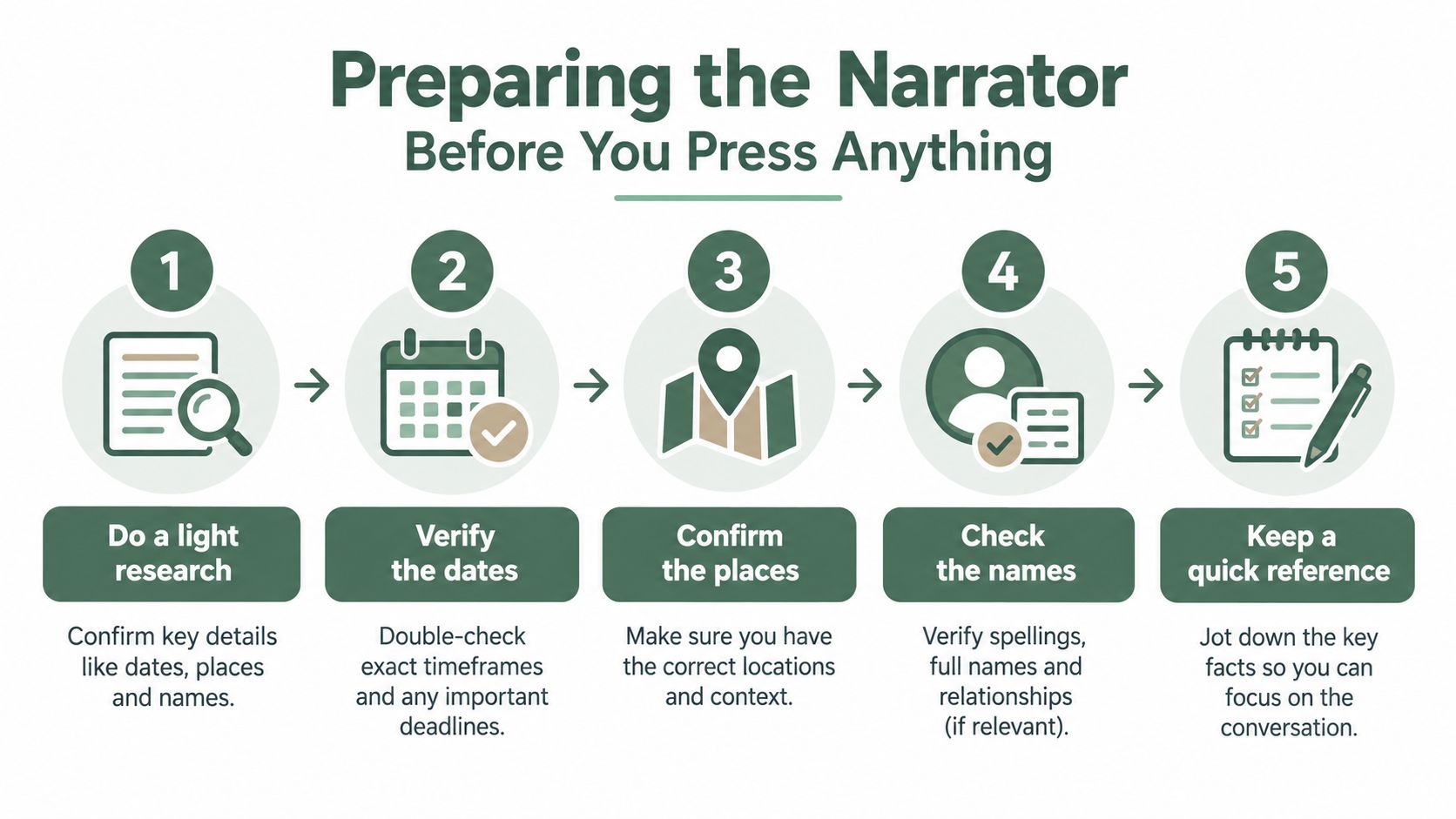
Print this checklist before the session:
- Reference sheet: Correct names, spellings, places, and relevant documents.
- Consent plan: Intended listeners, access limits, future sharing, and the signed release.
- Question outline: Topics in a sensible order, with room for unexpected memories.
- Room plan: A private, quiet space with alerts and household interruptions removed.
- Comfort check: Water, glasses, medication needs, and an agreed pause signal.
The unglamorous work decides whether the recording feels safe enough for the narrator to tell the story properly.
Choosing Video, Audio, or Both
Families often treat video as automatically superior. It isn't. Video captures expression, posture, photographs held toward the camera, and the way a hand rests on a table. It also introduces more demands, including lighting, bandwidth, visual comfort, file management, and the narrator's willingness to be watched.
Audio is usually more forgiving. A narrator can close their eyes, move away from the screen, and concentrate on the memory rather than their appearance. Audio also makes the essential spoken record easier to preserve and reuse. For families focused on durable storytelling, it should be the foundation.
The strongest setup is hybrid. Let the call platform provide a video record for family viewing, while a separate local recording creates a higher-quality audio master. Institutional guidance reflects this tension. Some oral history programs support in-person, virtual, or hybrid interviews with built-in video-conference recording, while other heritage standards reject platform and mobile-phone recordings in favor of portable recorders and WAV files. The oral history FAQ from the Science History Institute makes the format conflict clear.
| Format | Bandwidth Needed | Storage per Hour | Best For |
|---|---|---|---|
| Video | Higher, especially for a stable call | Larger and more dependent on resolution | Family viewing, gesture, photographs, visual context |
| Audio | Lower and more tolerant of connection problems | Leaner, with quality depending on the recording format | Long conversations, transcription, durable listening |
| Hybrid | Higher for the call plus a separate local workflow | Requires both a video copy and an audio master | Serious family projects balancing access and preservation |
My default recommendation is simple: use video for the live connection and create a separate audio backup whenever you can. If the narrator is comfortable, ask them to run a basic voice-recording app on a second device, placed near them and tested beforehand. For a more formal project, capture the audio locally as uncompressed WAV or AIFF, following archival guidance rather than relying only on the platform's compressed MP4.
If you're unsure how to plan a voice-first setup, this practical guide to life story audio recording can help you think through the audio side without letting video convenience dictate the archive.
Asking Questions That Keep the Story Moving
Good oral history interviewing doesn't sound like an interrogation. You ask a question, listen for the detail beneath the answer, and leave enough silence for the narrator to reach it.
Closed questions produce facts. Open questions produce scenes. Instead of asking, “Did you like your first job?” ask, “Walk me through your first morning there.” Instead of “Was moving difficult?” ask, “What did the house look like when you arrived, and who carried the first box inside?”
Sensory prompts work because memory is often attached to physical surroundings. Ask what the kitchen smelled like, which room was cold, who else was present, what people wore, or what sound the narrator remembers from that day. Don't lead with “Do you remember?” It suggests that uncertainty is failure. Invite the story without demanding perfect recall.
Give silence somewhere to work
A pause is not a problem to repair. The narrator may be sorting names, deciding whether a detail is safe to share, or discovering that the first answer was only the surface. Count before you jump in. If the narrator continues, follow their direction.
Ask one question at a time. “What happened next, and how did your mother react, and did you ever go back?” forces the narrator to choose among several paths. Split it into separate prompts and let each answer create the next question.
The guidance in this resource on interview questions for parents is useful when you need prompts that open a conversation without turning it into a questionnaire.
Follow the story, not your outline
If your father mentions an unfamiliar colleague, don't drag him back to the next planned topic. Ask who that person was, where they worked, and why they mattered. At the same time, don't accept every contradiction as a correction opportunity. Note it, keep the relationship intact, and return to names, dates, and places near the end, when trust is strongest.
Keep sessions reasonably contained. Archival guidance commonly places an upper limit at about two hours, because fatigue can weaken attention and narrative quality, as explained in the NOAA oral history guide. I prefer a shorter first session, with permission to continue later.
End with a question that gives the narrator control: “What should I have asked but didn't?” That final opening often produces the detail you couldn't have planned.
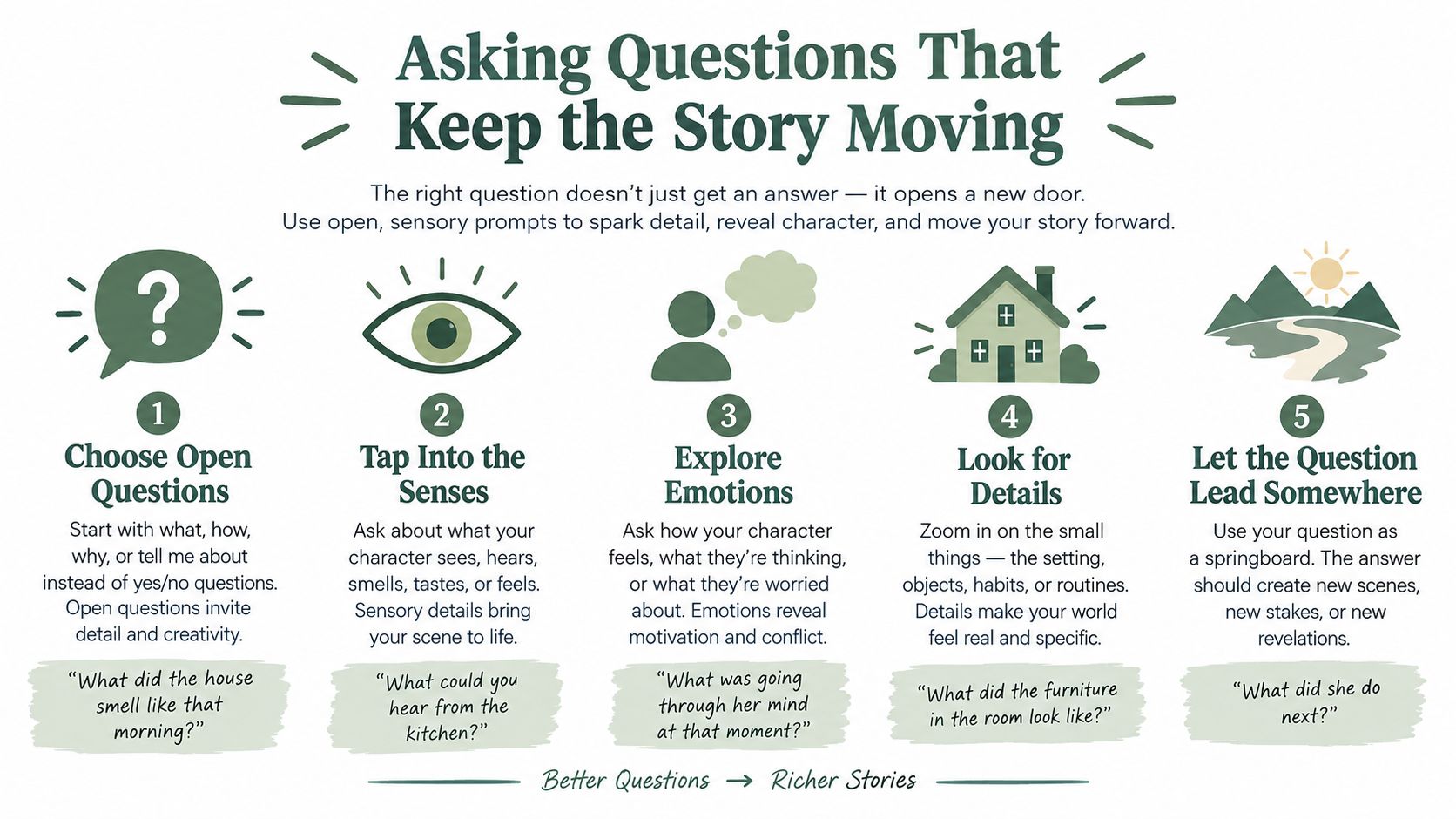
Use this short visual reminder before the call. The best prompt is rarely the cleverest one. It's the question that helps the narrator stay with a meaningful scene.
Setting Up the Tech So Nothing Fails
Your father's story can be warm, funny, and irreplaceable, yet still become unusable if one voice is missing or the file will not open. Build the interview around four pieces: a familiar platform, a microphone, headphones, and an independent recording. You do not need a studio. You need fewer ways for the recording to fail.
Choose the quietest room
The quietest room usually beats the largest one. Soft furnishings reduce reflections. Kitchens, bare living rooms, televisions, refrigerators, traffic, and open windows compete with the narrator's voice. Close doors, silence notifications, switch off unnecessary appliances, and tell household members not to interrupt.
Put headphones on both sides when possible. They reduce echo and let you catch problems during the interview, while there is still time to correct them. An external microphone generally outperforms a laptop microphone, but placement matters more than appearance. Position it close enough to capture the voice clearly without touching the desk.
Separate convenience from preservation
Zoom, Microsoft Teams, and Google Meet work well for access because families already know how to use them. Treat their recordings as access copies, not automatic archival masters. An account can change, a subscription can lapse, and compression can discard detail that a properly captured source preserves.
For an interview that matters, run a separate recorder. A phone or tablet can provide a basic backup if it records independently, has enough battery, and sits close to the narrator. For a project intended to last, use a recorder that creates uncompressed WAV or AIFF files. The NOAA guidance recommends uncompressed PCM WAV or AIFF, with 16-bit/44.1 kHz or better in one archival benchmark and 24-bit WAV in another recommendation, as noted in the NOAA guide cited in the questions section.
| Component | Minimum Viable | Archival Recommended |
|---|---|---|
| Platform | Familiar video-call service with recording | Familiar platform plus a separate local audio path |
| Microphone | Built-in microphone in a quiet room | External microphone positioned close to the narrator |
| Headphones | Comfortable headphones that prevent echo | Closed-back headphones tested before the session |
| Backup recording | Second device recording independently | Dedicated recorder creating an uncompressed WAV master |
Test the complete chain the day before. Start the call, record a sample, stop it, download it, and play it on another device. Confirm that both voices are present. Check the battery, free storage, cables, permissions, and the narrator's internet connection.
If the sample contains hum or room noise, consult a reputable guide to fix hum and background noise. Repair software can help with an existing recording, but it is not a reason to accept poor capture. Prevention preserves more of the original voice.
After the interview, place the files in cloud storage and in a separate local location. A guide to cloud storage for families can help you plan access and household continuity. The preservation decision is simple: keep an independent copy outside the platform account.
Archiving the Recording for the Next Generation
A recording becomes an archive when someone else can identify it, understand it, open it, and know whether they're allowed to use it. Sound quality matters, but sound without context is a mystery file.
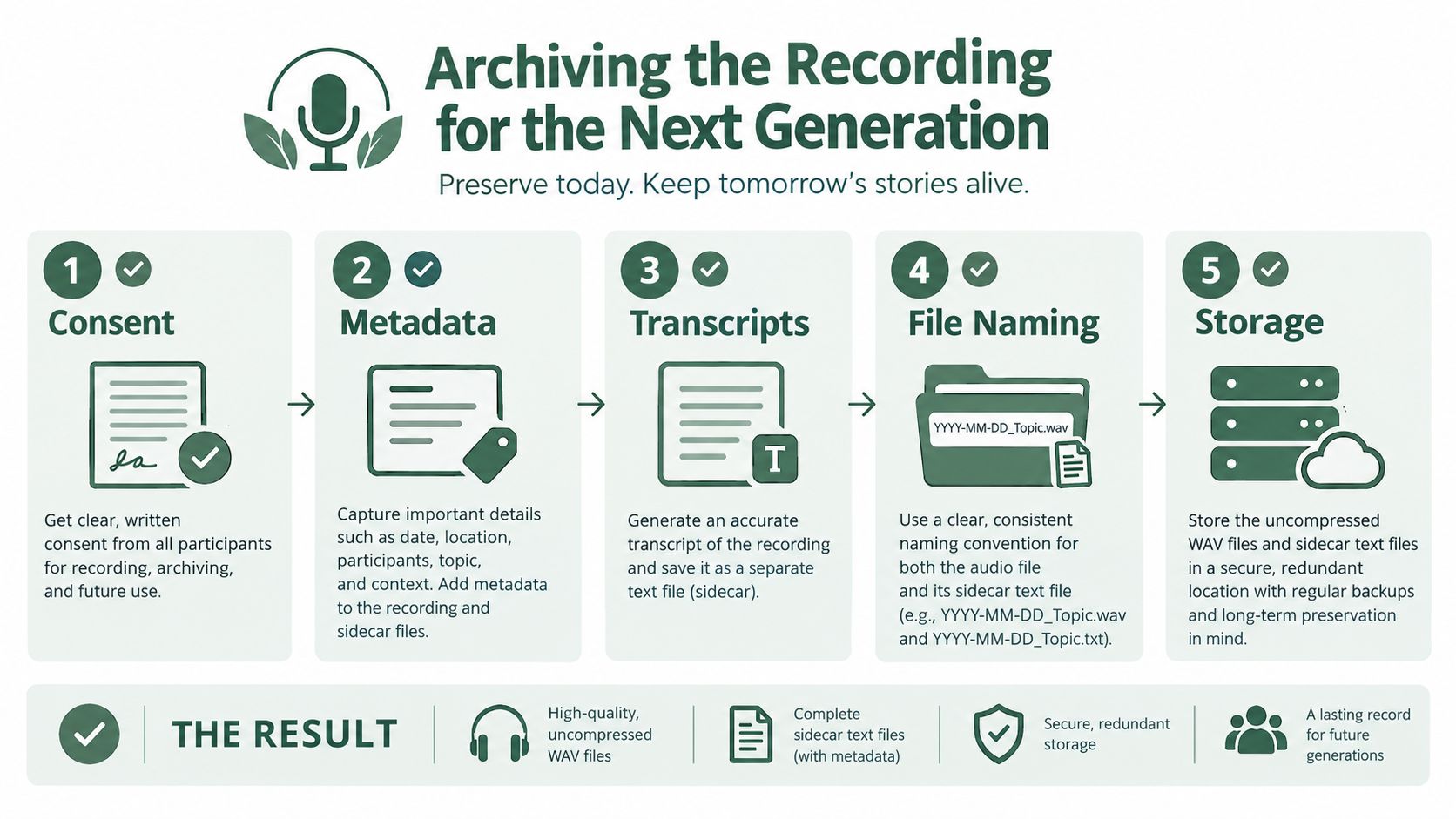
Start with the master recording. Keep the uncompressed WAV or AIFF when you have it, and retain the platform video as an access copy if it contains useful visual material. Don't overwrite the original while trimming silence, correcting levels, or adding titles. Work from a duplicate.
Attach the context
Create a plain-text sidecar file beside the audio. Include:
- Narrator: Full name, preferred form of address, and any privacy preference.
- Interviewer: Full name and relationship to the narrator.
- Date and place: When and where the interview occurred, including the remote locations if relevant.
- Topic: The main subjects discussed.
- Abstract: A short description of the contents, including sensitive sections or notable people.
- Rights: Who may listen, copy, quote, publish, or share the recording.
Use a predictable filename such as YYYY-MM-DD_NarratorLastName_Topic.wav. The pattern matters less than consistency. A future relative should be able to recognize the file without opening every item in the folder.
Transcribe soon after the interview, while names and context remain familiar. Automated transcription can create a useful first draft, but edit surnames, place names, technical terms, and phrases in dialect. Keep the transcript connected to the audio. A transcript is a finding aid, not a substitute for the narrator's voice.
Put permission beside the file
The legal release is the detail families skip most often. A narrator may agree to a private family recording but not public posting, commercial use, or unrestricted quotation. Write down the permitted uses, access restrictions, named custodians, and what happens if the narrator later asks for a limitation.
A signed document should travel with the archive, not sit in a separate email account that descendants may never find. If the interview includes other identifiable people, consider whether their privacy creates additional restrictions.
Storage needs the same clarity. Keep one copy in a reputable cloud service and another on an external drive stored somewhere physically separate. “Somewhere else” should also mean legally accessible to the people who will inherit the archive. A family member who can't locate the password, understand the folder, or interpret the release effectively has no archive.
For larger collections, this guide to archival systems for creators offers useful principles for organizing files, metadata, permissions, and long-term access. For a family project, the system can remain small. It just can't remain undocumented.
If the material began as paper photographs, letters, or handwritten memories, preserve those alongside the audio rather than separating the story from its evidence. A practical guide to turning memories into digital records can help you plan that wider family archive.
Starting This Week Without Buying Anything
You don't need new software to begin. You need a promise, a folder, and a date that survives the week.
Think of the eventual listener first. A grandchild who hasn't been born yet won't care whether you used the fashionable platform. They'll care that the voice is present, the story has context, and someone in the family cared enough to preserve it properly.
Use this seven-part plan:
Draft three open prompts by Sunday. Write questions that invite scenes, not verdicts. “Walk me through the day you left home” is stronger than “Were you sad to leave?” Your deliverable is a short prompt sheet you can use without reading mechanically.
Send a one-paragraph note on Monday. Explain why you want the interview, what you hope to preserve, how long the first conversation may last, and who will hear it. Ask what the narrator wants protected. The deliverable is a shared understanding before any recording begins.
Schedule a test call on Tuesday. Make it a separate appointment, not a rushed prelude to the interview. Confirm camera comfort, microphone position, headphones, lighting, room noise, and the recording controls.
Run the test and write down every fault. Listen for echo, hum, dropouts, interruptions, and unclear names. Don't trust your memory. The deliverable is a short repair list.
Choose the recording path after the test. If the family needs simplicity, keep the platform video and add an independent audio backup. If preservation matters more, use a local uncompressed WAV recording as the master. Make the decision based on what you tested, not what a platform advertises.
Choose one cloud destination and one local destination. Google Drive, iCloud, or a family Dropbox can hold the accessible copy. An external SSD can hold the local copy. Record the account owner and access instructions in the project notes.
Create one named folder. Use a clear structure such as
2026-10-05_Surname_FamilyStories, then place the recording, transcript, release, notes, and backup instructions inside it. The exact date should reflect the interview, not the day you happen to create the folder.
Send this text to a sibling today: “Dad has agreed to record his stories, so I'm setting up a short test call this week. Can you help me choose three questions and make sure the final files won't disappear?”
That message turns a good intention into a shared responsibility. If you want a place to record spoken memories, organize them into a life story, and keep transcripts available for later searching, visit remembers.life and explore how it supports voice and video memories. Use it as part of a wider family archive, alongside your own consent records and independent backups.